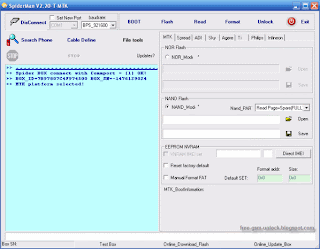
Introduction of Function "Button In SpiderMan Program
1. Connect Button Box Between Connecting Point For The Program,
If So Good Wired Connections Connect button will change to Disconnect
2. Options ComPort What You Can Use (Usually Will Automatically Detected)
3. Options Connection Speed Transfer Or Baudrate
4. Click to Start Mobile Boot
5. Click For Command To Start With Flash Mobile Options Nor Flash Or and Flash
6. Click For Command To Start reading Mobile Flash File Requested From Where Will
You Want To Read a File Flash Such
7. Click For Commands To Format Mem Mobile And If You Choose Format Option Manual
Then you Must Insert Address Format
8. Keys To Unlock Mobile Network
9. Keys To Finding Pinout Mobile can give us the RX, TX With the Right
(We can choose between 2 options: 1. To Mobile With 1 CPU, 2. For Mobile
With 2 CPUs)
10. We Can Use It To Save The buttons TX RX Already we can Earlier
11. Can We Use the buttons Converter For Flash File Extension BIN From The BIF
12. Button It Works For Thwarting All The Ongoing Operations
13. This Button To Go To Support Area
14. This button function is Changing our yangg Mobile CPU Use As: MTK, Spreadtrum etc
15. This button Flash Point To Open File We Want To Use For Flashing
16. This button Pointless For Choosing Place Where We Want to Save Flash Files Results Read
17. Same with keys 15 and 16, Just Only Here For Area NOR Flash Function
18. Button It Pointless To Fix Corrupt IMEI / Imei Change
Spiderman Read and Flash
SpiderMan connect to USB, Connect Mobile On Cable.
Choose the MTK (For CPU MTK), click the "Search Phone" Looking For Cable Pinout
1. Reading the Flash File
* Click "Save", Select Folder Where To Save Files
* Click the "Read", Press the "Power On" If Requested To Start Boot Loader
Reading Process File Flash
Reading Process Completed
2. Starting Flash Mobile
* Click "Open" Select File To Flash Who Want us Use
* Click the "Flash" Flashing Process To Start, Press the Power On If Requested
Flashing process Done